 Stroku
Stroku Server for Android
Watching without Real-Debrid
Stroku Server is a free Android app. Your phone fetches torrent results from your add-ons and passes the video to your Roku over Wi-Fi.
Version 1.0.3 · Android 8.0 or later
Before you start
Real-Debrid is still the better choice. It plays almost every result, starts in seconds, seeks instantly, and leaves your phone alone. Use Stroku Server only if you do not have it. Set up Real-Debrid.
- The phone and the Roku must be on the same Wi-Fi network.
- Keep the phone on and plugged in while you watch.
- How fast a video starts depends on how many people share it. Popular releases start in under a minute; rare ones may not start at all.
- There is no transcoding. A file in a format the Roku cannot decode will not play; pick another result.
- Your phone joins the torrent swarm, so other peers see its IP address. Downloaded data is deleted when you stop the server.
Set it up
-
Install the app
Open this page on your Android phone and tap Download for Android. When Android asks, allow your browser to install apps, then open the downloaded file and tap Install.
-
Open Stroku on your Roku
Stroku needs to be running so the phone can find it.
-
Start the server
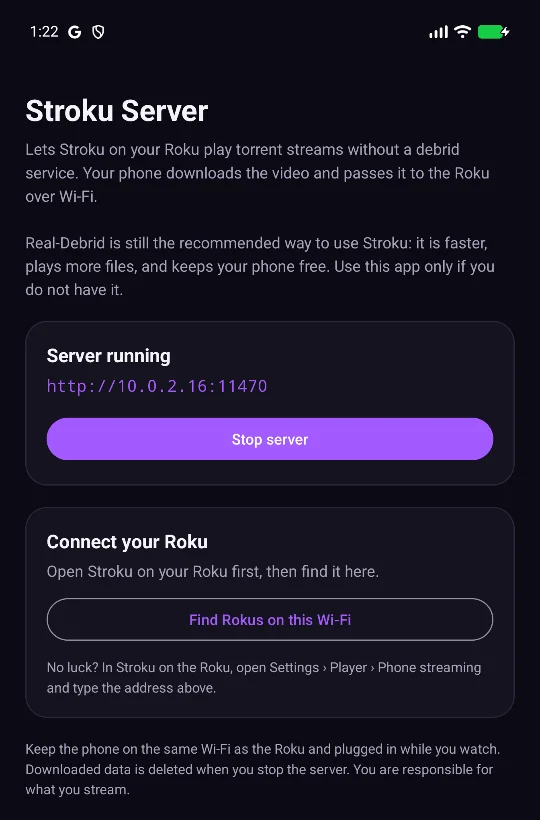
In Stroku Server, tap Start server. It shows an address such as
http://192.168.1.20:11470. -
Send it to the Roku
With the server running, tap Find Rokus on this Wi-Fi, then Send next to your Roku. The TV confirms with Phone streaming connected.
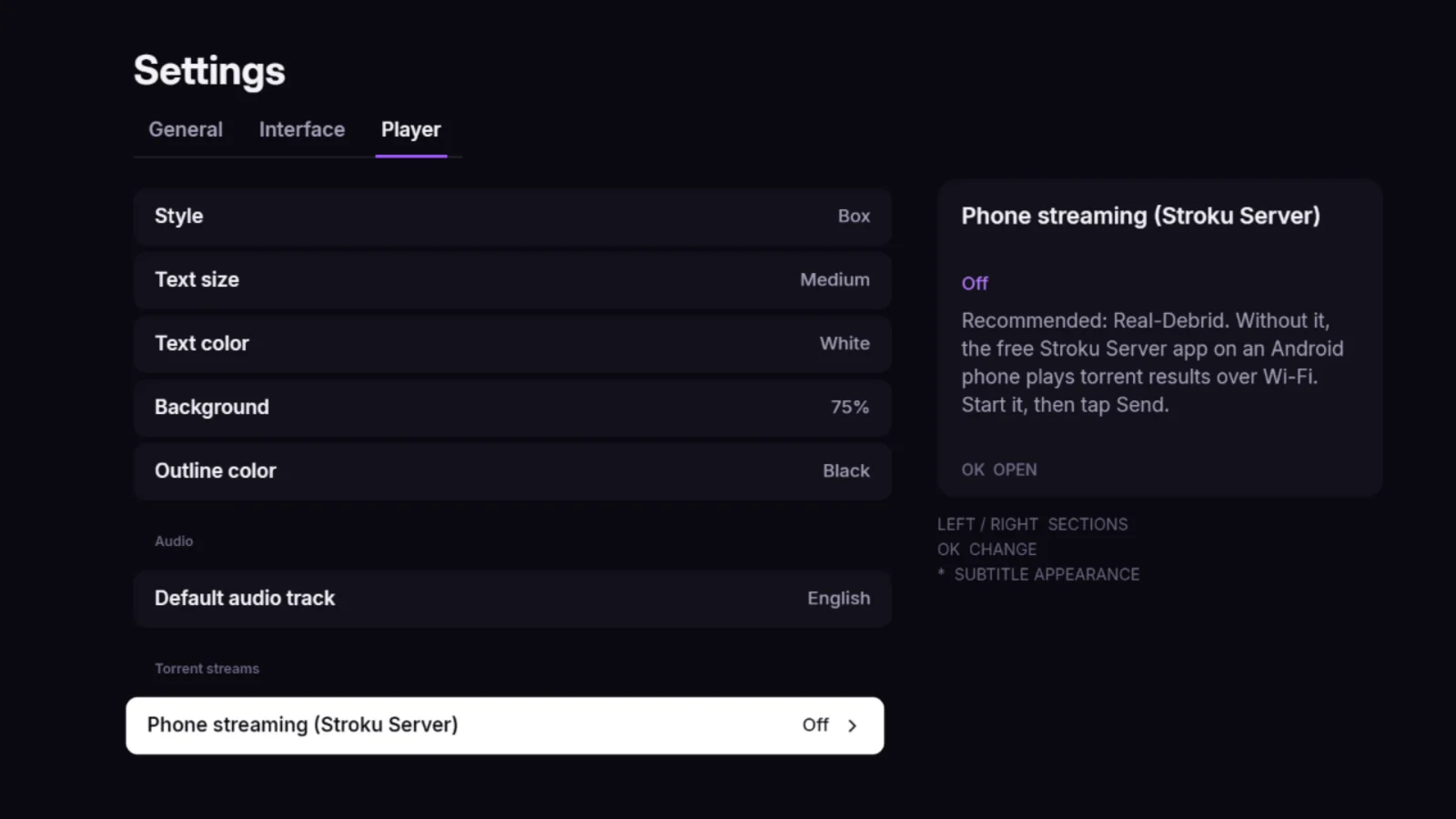
If no Roku is found (guest networks often block discovery), type the Roku's IP address (on the Roku: Settings › Network › About) into the field under the button and tap Send. Or type the server address on the TV: Settings › Player › Phone streaming (Stroku Server) › Enter Stroku Server address.
-
Play a torrent result
Open a title as usual. Torrent results now play and are marked Phone; direct and Real-Debrid links stay at the top of the list. The TV shows Getting the video ready on your phone with a percentage while the phone fetches the first part of the video, usually under a minute, then starts playing.
Troubleshooting
The TV says "Stroku Server did not answer"
The server is stopped, the phone is asleep, or it is on a different network. Open the app, check it says Server running, and make sure both devices use the same Wi-Fi (not a guest network).
Torrent results still say they cannot play
Phone streaming is off. Send the address again from the app, or enter it under Settings › Player › Phone streaming. Stroku checks the phone each time you open a title.
A video never starts, or keeps buffering
Too few people are sharing that release. Go back and pick a result with more seeders, usually shown next to the size.
I want to stop using it
Set Settings › Player › Phone streaming to Off on the TV, and tap Stop server in the app. You can uninstall the app at any time.
Is there an iPhone version?
No. iOS does not let an app keep a server running in the background, so Stroku Server is Android only.